A Video Speed Controller is a smart AI-powered tool that allows you to adjust the playback speed of any video. Whether you want to slow things down to catch every detail or fast-forward through the boring parts, this tool gives you full control. It works directly from…
A Video Speed Controller is a smart AI-powered tool that allows you to adjust the playback speed of any video. Whether you want to slow things down to catch every detail or fast-forward through the boring parts, this tool gives you full control.
It works directly from your browser without needing any software installation. By simply uploading your video, selecting your desired speed, and applying changes, you can make your videos look more professional, dynamic, and engaging.
With Taskhugs’ Video Speed Controller, you can:
- Slow down videos to 0.25x, 0.5x, or 0.75x
- Speed up videos to 1.5x, 2x, or even faster
- Create smooth slow-motion clips for social media
- Save time while learning or reviewing content
Why Use Taskhugs Video Speed Controller?
Learn Better – Slow down tutorials or lessons to understand every step.
Save Time – Speed up long lectures, podcasts, or meetings.
Create Content – Make slow-motion effects for Instagram, YouTube, or TikTok.
Easy to Use – No downloads or complicated editing – just upload and adjust.
Free & Online – 100% browser-based, quick, and user-friendly
Video Editing: Create cinematic slow-motion effects or fast-forward scenes.
Gaming Videos: Speed up long gameplay clips or highlight slow- motion replays.
Sports Analysis: Analyze player movements with slow motion.
Educational Content: Speed up tutorials or lectures for quick reviews.
Business Presentations: Make professional and engaging video content.
Social Media Videos: Create attention-grabbing clips for Instagram, YouTube, or TikTok.
How to Use the Video Speed Controller (Step-by-Step)
Using the Video Speed Controller is straightforward. Here’s a step-by-step guide:
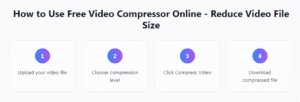
- Visit TaskHug.com – Go to the free online Video Speed Controller tool.
- Upload Your Video – Choose your video file from your device or drag and drop it into the upload area.
- Adjust the Speed – Use the slider or input box to choose how much you want to slow down or speed up your video (e.g., 0.5x, 1x, 2x, etc.).
- Preview the Result – Check how your video looks after adjusting the speed.
- Download the Final Video – Once satisfied, click “Download” to save your edited video.
The video speed controller instantly processes your video without losing quality, keeping both video and audio perfectly synced.
Key Features of a Video Speed Controller
- Speed Adjustment – Increase or decrease playback speed (e.g., 0.5x, 1x, 1.5x, 2x).
- Slow Motion Creation – Convert normal videos into smooth slow-motion clips.
- Fast Forward – Play videos faster to quickly go through long content.
- Custom Speed Options – Set exact speeds (like 1.25x or 0.75x) for better control.
- Compatibility – Works on different video formats (MP4, AVI, MOV, etc.).
- User-friendly – Simple interface, easy to use even without editing skills.
- Preview Option – Check changes before saving the video.
- Online & Offline Tools – Available as web apps, browser extensions, and video editing software.
Who Can Benefit from It?
- Students & Professionals – Speed through lectures, courses, or meetings.
- Content Creators – Add cinematic slow-motion for better storytelling.
- Gamers – Slow down gameplay replays to analyze moves.
- Fitness Trainers – Break down workouts in slow motion for clients.
- Education – Speed up online lectures or slow them down to take notes.
- Entertainment – Watch movies, vlogs, or music videos at custom speeds.
- Sports Analysis – Slow down clips to study techniques or movements.
- Video Editing – Add slow-motion or time-lapse effects for creativity.
- Content Creation – Make engaging videos for social media platforms.
Example Use Cases
Learning: Slow down a coding tutorial to catch every step.
Entertainment: Speed up a movie recap to save time.
Social Media: Create aesthetic slow-mo reels for Instagram.
Sports: Analyze football, cricket, or dance moves in slow motion.
Why Choose Taskhugs Video Speed Controller?
Unlike basic media players, Taskhugs’ AI-powered Video Speed Controller works online, instantly, and without requiring heavy software. It’s the perfect blend of simplicity and creativity, making it a must-have tool for students, professionals, and creators alike.A Video Speed Controller is a powerful tool to customize how you watch and edit videos, giving you full control over playback speed, whether you want to fast forward, slow down, or create cinematic effects like slow motion.
- Content Creators: YouTubers, vloggers, and influencers to make videos more dynamic.
- Students & Teachers: For creating educational videos at customized speeds.
- Marketers: To adjust promotional videos for better engagement.
- Filmmakers: To experiment with slow-motion or time-lapse effects.
- Gamers: To highlight or speed through gameplay footage.
Conclusion
In today’s digital world, controlling your video’s speed is a creative necessity. The Video Speed Controller tool allows users to change video playback speed, create slow-motion scenes, or fast-forward sequences easily — all without needing advanced editing software.
Whether you’re a YouTuber, student, or business professional, this tool gives you full control over your video pace to make it more engaging and effective.
If you’re looking for a free, fast, and user-friendly video speed controller, TaskHug.com is the perfect choice to transform your videos in just a few clicks.
Try the Video Speed Controller Now! https://taskhug.com/tools/video-speed explore more tools-
https://taskhug.com/tools/video-resizer
https://taskhug.com/tools/video-thumbnail
https://taskhug.com/tools/video-watermark-remover